For many churches, embracing technology – especially computer projection – can still feel daunting. Those that have made the leap often rely heavily on PowerPoint because it’s familiar and easy to use, despite its inherent limitations. But could there be a better option?
There is now a growing number of purpose-built alternatives, with time-saving features designed specifically for worship services. So, what’s holding so many churches back? If you’re still reliant on PowerPoint, why should you consider making the change, and what will you gain?
Here are the five top reasons we believe a dedicated church presentation platform will benefit your church.
1. THEY SAVE YOU TIME
Let’s face it, we’re all too busy! If you’ve ever found yourself up late, searching the internet for bible passages or song lyrics (which may or may not be accurate) then pasting and formatting them, slide by slide, into your service slides, then this one is for you. PowerPoint was never designed for church services, which means it can take a lot of time and effort to source the content you need and prepare your slides.
Dedicated church presentation tools do the hard work for you. Good ones come pre-loaded with bibles, backgrounds, and motion graphics, and include smart formatting tools to make setting up your songs easy.
2. THEY DON’T NECESSARILY COST THE EARTH (OR ANYTHING IN FACT!)
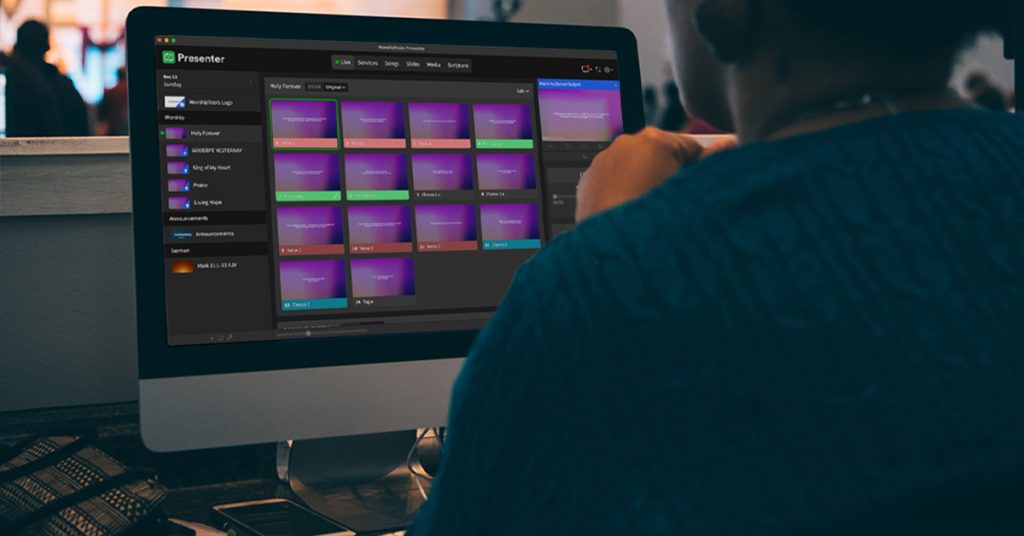
If you think church-specific software will be expensive, you may be surprised. Presenter by WorshipTools is an example of a presentation application made for churches that can be used completely free of charge. Its creator, Adam Meyer, designed it for his own church when he began serving on the media team and found existing options to be both limiting and expensive.
Presenter is now one of the leading church presentation solutions. It offers different plans, some with more advanced features that you pay for. Yet Adam says more than 80% of users find that the free version is more than sufficient for their needs.
3. THEY’RE EASIER TO LEARN THAN YOU THINK
From CCLI’s own customer surveys, we know that fear is one of the main reasons for a reluctance to try new technology. However, many church presentation applications are deliberately simple and intuitive to use, having been designed by people who understand the challenges of learning something new. Plus, most will provide a range of support options such as articles and help-videos. And because they’re small, organisations like WorshipTools offer email support by staff who actually use the applications in their own churches.
The reality is rarely as scary as the perception, and because the software is designed specifically for worship services, you won’t be faced with a range of features you’ll never need.
4. THEY INTEGRATE SEAMLESSLY WITH THE OTHER TOOLS YOU USE
Another key benefit of using many popular church presentation solutions is the fact that they can often be connected to other applications used by your team. Most church presentation software integrates with SongSelect, CCLI’s database of lyrics and sheet music, meaning any church with a Church Copyright Licence has free access to CCLI’s database of authorised song words. These can be pulled instantly into your presentations ready-formatted, or adjusted with just a few clicks.
But it’s not just before the service that this integration is so helpful. If you’ve ever shouldered the responsibility for CCLI reporting, you’ll know how time-consuming it can be. A growing number of worship applications including Presenter by WorshipTools, ProPresenter, and Easy Worship, can now report songs back to CCLI automatically, provided they contain the CCLI song number. Use SongSelect to pull in your lyrics and the song number will always be included, meaning the task of CCLI reporting is fully taken care of.
WorshipTools has developed other free applications to make life easier for churches. A free service planning and scheduling tool, appropriately called Planning, is designed to help with service flow and scheduling volunteers. Community is a simple, free church database tool, while their free digital music stand App, Charts is designed to keep musicians on the same page. All applications integrate with Presenter, so set lists and service plans sync from one to the other, and for everyone who’s signed in.
5. THEY ARE PACKED WITH FEATURES YOU DO NEED
If simple and feature-packed sounds like an oxymoron, you may be surprised. The beauty of dedicated software is that the features you get are the ones that are actually useful for running church services. Whereas PowerPoint is weighed down with all kinds of features that you’ll never need, church presentation applications can be powerful without being complex.
As well as lyric integration, many come pre-loaded with popular bible translations. Some, like Presenter, provide motion graphics, backgrounds, and templates, while videos can be imported or streamed live from within your slides.And, if you’ve ever been there, mid-service, needing to jump to a slide somewhere else in your presentation, and having to scroll back or forth as you can only see what everyone else sees, a stage display output can be a real life- saver!
At the core of all WorshipTools applications is cloud syncing. According to Adam Meyer, this means “anywhere access to your lyrics, videos, images, and cue lists from any computer or device. Gone are the days of staying late to finish a presentation, or needing to transfer presentations and media from home to church.”
So there you have it. Five good reasons to embrace the new. So why not give dedicated church presentation software a try? What have you got to lose?
WorshipTools is part of the CCLI Family. To try their free applications visit worshiptools.com. For more about SongSelect visit songselect.ccli.com. To learn more about CCLI Auto-reporting visit ccli.com/auto-reporting.
To contact CCLI call 01323 436100, email uk@ccli.com or visit ccli.com.